

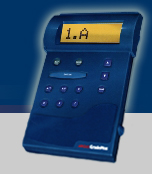





Entering
the Student ID Number into the GradePlus unit:
IMPORTANT
NOTE: This must be done correctly the first
time, or your unit will need to be serviced by the factory.
Procedure:
Example: Student ID Number is 123456789
Press the On/Off switch located on the right side to power on the GradePlus
unit.
At the initial power-up, the unit will prompt for a Student ID number.
There are 12 available locations for your number but, the number must be right justified. Example: If your student number is 9 digits long, press the "ENTER" key 3 times so the flashing cursor is on the 9th digit location.
The display will show ID=000000000000
Then press the up or down arrow buttons to locate the first digit of your ID. Once the first number is located (a "1" for our example), press the "ENTER" button.
The display
will show ID=000100000000
Your number selected will be recorded and the unit awaits input of the next
digit.
Repeat the process until finished. (If the number is not correct, press the "ENTER" key to return to the location that needs changing.)
The display will show ID=000123456789, for our example.
When satisfied
press the "SEND" key.
From now on, after power-up the GradePlus unit will prompt for a Form type,
then test answers, beginning with question #001.
NOTE: if the Student ID is entered/sent wrong, contact Argus International or, if purchased at your bookstore, contact them immediately. You will either need to exchange the unit or send to Argus International to have the unit cleared.
Directions
- Taking a Test:
1. Read
the question and available answers provided. Record your choice by depressing
the desired key that corresponds with your selection. Check the display to
make sure the answer you wanted is the same as the one displayed.
2. If the answer displayed is the desired selection, depress the "ENTER"
key and the Grade Plus will save the answer in the memory and proceed to the
next question #.
3. If you need to change a previously saved answer, depress the "CHG"
key, then depress the key you would like to change to, and press "ENTER".
Note: Be sure the question # you are reading is the same as the number you
are answering.
4. You may skip questions, to be answered later, by either pressing "ENTER"
or selecting the "?" key and pressing "ENTER".
5. After completing the test, depress and hold the up or down key and it will automatically stop at any questions that were left with a blank or a question mark ("?").
Downloading
Your Answers:
1. When you have completed the test and are satisfied
with the answers, take the GradePlus unit, place it by the instructors' computer
adjacent to the infrared reader, and depress the "SEND" key.
Note:
Your test answers will be verified twice, downloaded and stored, graded against
the exam master, and the results will be transmitted back to the display of
your GradePlus unit in the form of; "Score (# correct) of (# possible)".
If the display shows a message as "ID Not Known!" see the instructor
to resolve and verify your ID number.
2. Write down your test results if desired and then press the On/Off switch
located on the right side of the GradePlus unit to power down.
Clearing
the Memory for your next test:
To
clear the memory of any data previously stored in the unit, turn the unit
off. Hold down any key as you power the unit up. Wait for the message in the
display to read, "CHG ERASES ALL!" Depress the "CHG" key
to erase all data stored in the memory. Pressing any other key will cancel
the 'erase' and keep all data stored.
Maintenance
of the GradePlus unit:
Batteries: Press the On/Off switch located on the right
side to power on the GradePlus unit. The display will inform you of the approximate
battery life available ("Battery OK", "Battery Low", or
"Replace Cells"). To check the battery life at any other time, depress
the "BAT" key; the battery strength message will appear on the display.
Note: If the display reads "REPLACE CELLS" replace ALL batteries with fresh ones to maintain optimum performance.
Accessories available for the GradePlus unit:
Batteries: Set of 4 AAA batteries
GP Cover: Protect your unit from scratches and damage from bouncing around your backpack. The GP Cover slips over the GP Unit and keeps the display from being exposed to possible damage. These covers are made from a leatherette material and can be attached by the belt loops or clasp to help prevent loss and misplacement.
Use the order form to purchase these items from Argus International.