

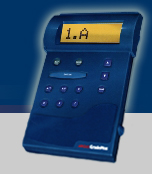





How
can I... Iz - need to re# the questions to follow a
'flow'
 Check for battery strength?
Erase the last test answers?
Put in my Student ID?
Skip a question and go
back to it later?
Change an answer?
Download my answers to
the Instructor's computer?
Get my GradePlus unit checked
out?
Other Q & A
1.
How can I be sure the answers I put in my unit are the same ones that get
graded?
When the "Send" button is depressed and the GradePlus Software recognizes
the coded signal, all data is grouped into the computer's memory. The data
is verified twice against the handheld unit before being stored permanently
on the computer's hard drive. If any information packet is not exactly the
same an error message is transmitted back to the handheld unit and no information
is altered. Two separate data files are recorded and stored with all the data
to be graded, scored, and recorded, amazingly, in just two seconds.
2.
What happens if my batteries run out in the middle of a test?
All the data that is input into the unit is locked into the memory chip until
it is transmitted or purposely deleted. Changing batteries in the middle of a
test will not erase any answers previously entered into the unit. Remember to
check the batteries life as you power on the unit, prior to a test. Have an extra
set of 4 AAA batteries on hand.
3.
What if the unit is accidentally turned off before I 'Send' the answers?
All
data input into the unit is locked into a memory chip until transmitted or purposely
deleted. Turning the unit off in the middle of a test will not erase any answers
previously entered; the unit will reset back to Question (1) when turned back
on.
4.
What if I push the 'Send' button before I reach the instructor's computer?
When the "Send" button is pushed it sends a signal out and waits
for a response. Until it receives the response nothing will happen. If you've
accidentally hit the "Send" button, pressing the "Enter"
key to stop sending the signal. When ready to transmit, place the GradePlus
unit in front of the instructor's infrared port and press "Send".
Every answer will be stored in the instructor's computer.
5.
Do I have to be at the beginning or the end of my answers to send them to the
computer?
No. When you press the "Send" button, all the stored data is transferred
to the instructor's computer as a complete document..
6.
Can I change an answer to a previously answered question?
Yes.
Any answer may be changed before sending - find the question number, press the
"Change" button, select the new answer, and press the "Enter"
button.
7.
What if I skip a question and don't skip the space for the answer?
(Important Note - If you're not sure of an answer, press/use the Question
Mark; you can go back to it later. If you omitted the Question Mark and didn't
skip a question, it means you've probably recorded the next answers for the
wrong Question #'s. )
If this is the situation, you have two choices: (a) change each answer one at a time, or (b) erase the whole test and start all over.
8.
Is there an easy way find the questions I skipped over?
Yes.
Depress the up or down arrow key and keep it depressed. The GradePlus unit will
scroll through the answers, stopping at any blank spaces or ones marked with a
question mark.
9.
When I went back to check my answers there was nothing in the spaces. Where are
my answers?
Important note: You MUST press the "Enter" key after selecting your
answer to log it into the unit's memory. The answer will not be saved if you
use the up or down arrow key to advance to the next question. Once accepted,
input will automatically increment to the next question.
10.
The answers for my last test weren't erased and are still showing in the GradePlus
unit. What do I do?
To clear the memory of any test data previously stored in the unit (except
the student ID) turn the unit off. Hold down any key as you power the unit
up. Wait for the message in the display to read, CHG ERASES ALL! Then, depress
the "CHG" key to erase previous test data. Press any other key to
cancel the erase sequence and keep all data stored.
11.
I messed up putting in my Student ID and now it doesn't prompt me to enter it.
What do I do?
This is a security feature to prevent stolen units from being used by others.
Please contact Argus right away -- in most cases the GradePlus unit must be
cleared by the factory. Contact us for the best solution option.
For newly purchased units, clearing and testing the GradePlus unit is available ($5.00 for shipping charges). A $5 fee applies if a unit is returned over 30 days from purchase date, plus shipping ($5).
Ship your GradePlus to Argus with proof of purchase and we will service the unit and return it to you promptly. Send your unit with applicable fees and your return address to Argus International, LLC. Click here for a Service Request form.
Back to
top