






System Requirements:
|
133 MHzPentium processor (or greater) (PC Notebookrecommended; enables use in classroom or test site) |
| Windows 95 (or higher) with mmminimum of 32 MB RAM |
|
Serial port available for Infrared connection |
| Microsoft
Excel 97 (or higher) software |
| Microsoft
compatible mouse mm(optional) |
| Windows
compatible printer mm(optional) |
| VGA
color monitor (SVGA color monitor recommended) |
The
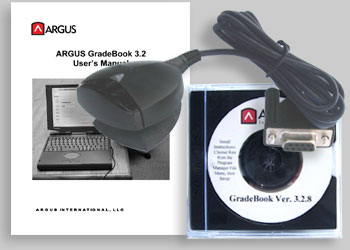
Instructor Kit
Includes the GradePlus Gradebook software
program, one Infrared serial port (connects to the
computer*), and access to the detailed
User Manual (pdf file).
The
Deluxe Kit
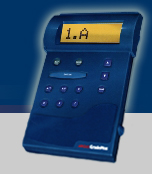
Includes the Instructor Kit, with one GradePlus unit (batteries
included), and access to download the Set-up and the Unit Operation instructions.
Having the GradePlus unit may help in the setup and checking of the exam process
and also comes in handy as a substitute unit.
(See the Manual for more information.)
About
the Argus Gradebook Software program
The Argus Gradebook software operates on the Microsoft
Excel program platform. Installation is easy and the step-by-step User Manual
will guide you through the easy process of creating a roster, Class folder, exams
and answer keys. Once processed, you can select how you want to have the data
presented through various forms.
The GradePlus software allows you to create many different types of reports.
- Gradebook Report
- Attendance Summary Report
- Class Responses Report
- Individual Responses Report
- Grade Distribution Report
- Score Distribution Report
- Item Analysis Report
Here's
the features and benefits:
- Automatically post results to students on the roster using the Grade Book report.
- Set the Grade Book up to work on points or percentages; allocate exam weights.
- Use the Item Analysis feature to check individual test questions - see how students answered and whether questions should be reviewed or if the class understood the topic.
- The automatic Re-grade feature gives you the freedom to throw out a question, add to a student's point total, or add multiple correct responses to a question.
- Print out a Class Exam Report to review an exam with your class. It will tell each student which questions they missed and the correct answers.
- With the Individual Exam Report students receive a printout of their answers and what they missed. It includes a summary of how they stand in the class on the whole for the exam.
- Print
a standard grade and score distribution report.
See About
GradePlus for general information
on the GradePlus unit.
For a detailed explanation, click on Downloading
Answers for
how students' test answers will be processed.
Click here for information on the GradePlus unit's maintenance.